Favorite Photos of 2023

As we come to the end of 2023, I want to take some time to look back and reflect on what a great year 2023 was for my photography. I started tracking the number of species I’ve photographed this year and I’m now up to 103 with a few days left in the year.

So many firsts and exciting photographic opportunities this year: capturing a kingfisher in flight, finally locating some of the owls that live in our area, and the biggest of them all, seeing American flamingos in Central Florida (they were thrown off course by the hurricane that hit our area in the fall).

Not much has changed in terms of settings and equipment for me. The biggest change was the addition of a Ground Pod and a Benro gimbal head to my toolkit. I love both pieces of gear and I never go out to the shore without this combo now. It really allows me to get low and experience shorebirds (what has become my preferred niche) from a much better perspective. I also love what it does to the background, which comes out buttery smooth due to the separation.

If there has been a significant change in my photography is that I am starting to find my niche a little bit better. I do have to make some allowances for my visual impairment, and one of those is my limitation in capturing photos of warblers and other small birds that live in the woods (where the lighting is not good for me or my lens). I have found raptors and shorebirds to be the birds that are the easiest for me work with: raptors don’t really feel threatened or pay you much attention to you, and shorebirds are often out in the open at places like Fort De Soto where I can walk by myself without much danger of running into someone or falling (especially in the early morning when just photographers are present). I have added the location to each photo for reference – I tend to stick to Pinellas County Park locations that have pretty good accessibility. 

I’ve created a slideshow with music highlighting what I consider my best photos of this year – I hope you enjoy it. Each entry includes a link to the full description and other information about the bird on All About Birds, along with my recollections of the specific shot.

  • Carolina wren: this little bird often greets us with its “tea kettle” song when we get to the woods at John Chestnut Senior Park. This one was peeking in and out through the openings on a fence that is in place on one of the boardwalks near Lake Tarpon to protect walkers from the gators. 
  • Red-shouldered hawk: I love the bigger birds, such as owls, hawks and other raptors, because they are easier for me to find and photograph. Even then, it can be difficult to track these birds as they fly through the woods. I was lucky that this beautiful bird came down and perched in the open on top of a post for a few minutes, just long enough for me to capture this portrait without branches getting in the way. Location: John Chestnut Senior Park.
  • Reddish egret (state threatened): I love the antics of the reddish egret while it is looking for fish. It appears to dance over the water. This one got lucky and nabbed a little fish in the shallows. I was hoping for it to do the fish flip they often do before swallowing the fish, but no luck that time. At least I captured it holding the fish as it moved through the shallow waters doing a slight wing spread. Location: Fort De Soto.
  • Black skimmer (state threatened): Capturing a skimmer in flight was pretty challenging for me. To be honest, this is a lucky shot where I shot a series of photos (“spray and pray”) and this one was sharp enough to share. Next goal is to capture one actually skimming the water which is how they feed by capturing fish with their highly sensitive bills. Location: Fort De Soto.
  • Northern parula: This is about as small a bird as I can photograph. Lucky for me, this parula was perched just a few feet away in an open branch and its bright blue and yellow colors made it easy for me to find in the viewfinder. Location: John Chestnut Senior Park.
  • Least bittern: One of the most elusive birds I photographed this year. The least bittern blends in really well, often holding its neck up and swaying along with the surrounding reeds in its habitat. I was lucky to find this one in the open right after arriving at the wetlands on a very early Saturday morning. It did its heron thing and just stood perched very quietly along the edge of a bunch of high grasses. Location: Roosevelt Wetlands.
  • Yellow-crowned night heron: I captured a few photos of this heron over the year, but this portrait was my favorite. Location: Largo Central Park Preserve.
  • Piping plover: I have a soft spot for the “peeps,” the little plovers that make Fort De Soto home for much of the year. The cross-country journey these little birds make to get here is nothing short of amazing – many of them come from as far as the Great Lakes region. This shot of a single piping plover standing in the mudflats was taken at ground level with the Ground Pod.
  • Roseate spoonbill (state threatened): This photo almost didn’t happen. I got to the beach early one Saturday morning and this pair of spoonbills walking slowly in the tidal pool were the first two birds I saw. They were walking in sync with each other. Right after I clicked a few frames of these two, the leader of the bunch gave the signal and the whole flock flew out to the other side of the park. Location: Fort De Soto.
  • Whimbrel: A somewhat rare visitor to our area, I’m proud of this frame because I first found the bird by ear (something I’ve been working on this past year). Once you find where the whimbrel is located, it is easy to identify it due to its long, downturned bill which is unique among the shorebirds. I’m hoping to see a long-billed curlew, which has been a rare visitor and looks very similar to the whimbrel, just with a much longer bill. Location: Fort De Soto.
  • Red shouldered hawk: I was out on a field trip for the local Audubon group when this hawk just landed in front of me on an exposed stump at Taylor Lake (which was drained for repairs on the access road and resulted in many shorebirds coming to the park and staying in the exposed lake this summer and fall). It took me a while to notice that the hawk was struggling to grasp a small snake in its talons. After a bit, it got a good grasp and flew up to a nearby tree where it proceeded to swallow it (I did not capture that part of the experience). Location: John S. Taylor Park.
  • Reddish egret: This was one of my first times using the Ground Pod to get real low and capture this reddish egret walking along the mud flats on a day when the tide was really low (my favorite time to go to Fort De Soto).
  • Wilson’s plovers: Not as common but still plentiful at Fort De Soto are Wilson’s plovers (soon to be renamed based on a new policy that will give birds names based on their characteristics or behavior instead of naming them after the person who discovered or popularized the species). I loved the way these three were lined up while resting among the grasses at north beach, with just the one in the middle in focus.
  • Barred owl: We were actually looking for a hawk when my partner Cindy noticed this small owl clinging to the side of a dead tree. It stared at us for a bit before flying off in search of its next meal. We are lucky to have quite a few of these beautiful birds at John Chestnust Senior Park. Please avoid the use of rat poisons which can kill not just owls but many other predators (as happened last year at another park where an entire family of great horned owls were killed by poisoning). Location: John Chestnut Senior Park.
  • Great horned owl: Speaking of finding birds by ear. We heard this one hooting in the woods and eventually found it perched on a tree where I was able to take this nice portrait. Wish the branch were not in front of it covering some of its face, but you get what you get when you get it. They are not exactly models who respond to directions. Location: John S. Taylor Park.
  • Belted kingfisher: Another lucky shot. A pair of kingfishers were making feeding runs up and down the banks of the Taylor Lake. I just fired away and got a few frames of this fast flying bird. This is just one of about four frames I was happy with. Location: John S. Taylor Park.
  • Blue gray gnatcatcher: This is very common bird, but I defined it as my “nemesis” because it is really small and flighty bird. It rarely sits still. We were having a conversation with another photographer on one of the paths when this one just came down and perched for a few seconds and voilá, I got my gnatcatcher. Location: Largo Central Park Preserve.
  • Great egret: Another common bird, but I really liked the contrast of the white bird with its wings spread as it took off and flew across the wetlands with the browns and yellows of the grasses in the background. Location: Roosevelt Wetlands.
  • American white pelican: These large white birds are real snowbirds. They start arriving in large flocks in November and stay here for most of the winter. I was able to find a large flock of them on a weekend visit to Fort De Soto, but this portrait was actually taken when I found about five birds floating near the banks of Crescent Lake in downtown St. Petersburg.
  • Snowy egret: Another common white heron found throughout our area. I liked the determined look on this one as it grabbed on for dear life on the rocks near the fishing pier at Fort De Soto.
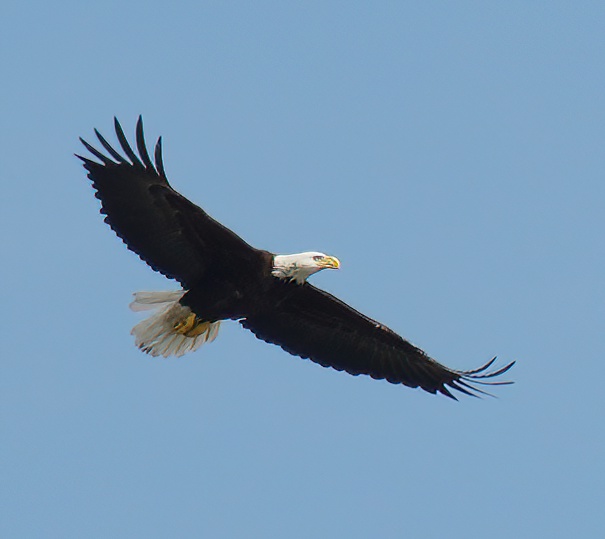
  • American bald eagle (protected): The bald eagle population is showing signs of stabilizing in Florida, but these birds are still protected. They are typically in tough to reach areas where it is difficult to photograph them even with a long lens. That was the case with this one, which has a nest near Lake Tarpon. However, the pair often come over to the side of the park we visit and I got lucky when this one flew above us. It was a cloudy day so the background is not the best, but I’m just happy that I was able to get a somewhat sharp photo since I didn’t have a chance to change my settings and just had to pan with the bird as it flew overhead as well as I could. Location: John Chestnut Senior Park.
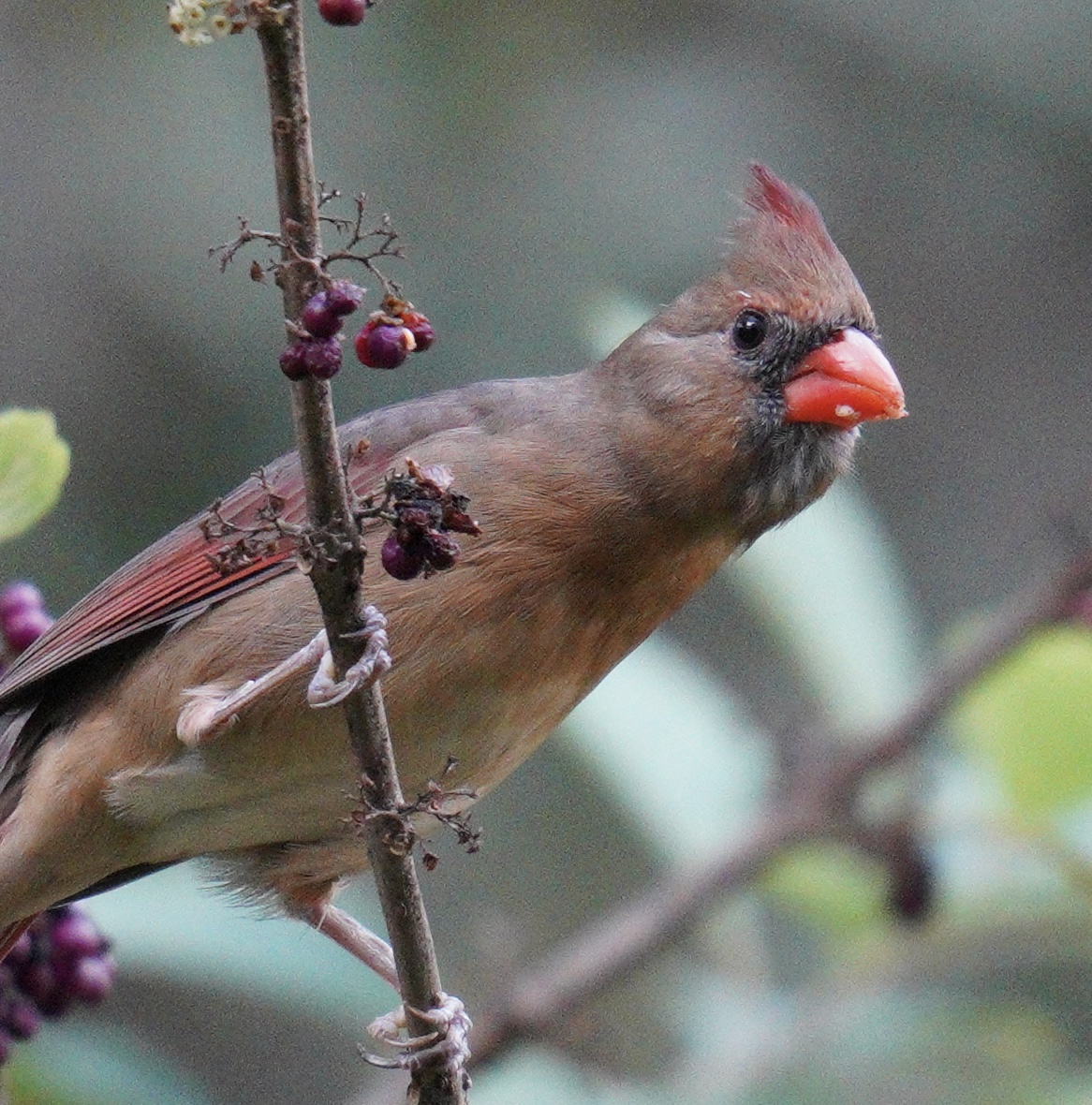
  • Northern cardinal female: This female cardinal (note the brown, not red, plumage) was just a few feet away from me on the boardwalk. Location: John Chestnut Senior Park.
  • Royal terns: These are really common terns on our beaches. I captured these two appearing to have a squabble with each other at the East Beach turnaround at Fort De Soto. One of them was likely encroaching on the space of the other, who was not too happy about that and let out a good cry.
  • Black necked stilt: We were lucky to find a family of stilts with their three newborn chicks at the Roosevelt Wetlands this past summer. I loved seeing those furry little balls walking across the mudflat and this shot captures mom and one of the chicks together. Location: Roosevelt Wetlands.
  • Reddish egret: This is a juvenile that was hanging out at Fort De Soto’s north beach with one of its parents who was teaching this young birds the ways of the heron. It seemed to be playing with these dead weeds, picking them up and putting them down. I captured it just as it noticed me and gave me that heron stare. Location: Fort De Soto.
  • American flamingo: Our celebrity visitors for the year. One of these flamingos (nicknamed Peaches) was banded and has a tracker to assist with research. I took several photos of Peaches at the East beach turnaround at Fort De Soto and I thought I was done with flamingos for the season. Then one day I was about to leave Fort De Soto’s north beach when word got out that two flamingos had landed and were feeding in the shallows. I took a chance on this one, having to wade through almost knee high water to reach a very small sand bar where a few of us photographers huddled together down low to capture this kind of shot (another Ground Pod shot). Location: Fort De Soto.
  • American oystercatcher (state protected): I thought I would end on a happy note. For the first time in several decades we had oystercatchers nest at Foret De Soto’s north beach. I was lucky to take this photo of mom AE and one of her chicks trying to stay warm by huddling against her chest just a few days after the three chicks hatched. I have since captured many shots of the banded birds (AE the mom, Archie the dad and Y3-Y5 the three chicks who are now grown and largely on their own). The area where they nested has sadly been wiped out by the surge from the hurricane but hopefully something can be done so that they continue to nest and add to the population of oystercatchers.

As the video concludes, the following text appears on screen: 1 in 4 birds have been lost since 1970. Many of the birds in this video are threatened or endangered. Find out how you can help at 3billionbirds.org.

That’s a wrap (almost) on 2023. If I get any good photos over the next week of vacation, they will be posted on my Vero site as usual: vero.co/lfp1211. My goal for the next year is to get to 150 species and to complete some of the categories of local birds for which I am only missing one or two species: owls (barn and screech), woodpeckers (northern flicker and yellow-bellied sap sucker), hawks (red tailed, Cooper’s) and falcons (merlin and peregrine). Putting that out into the world so that it becomes a reality. It’s worked so far!
How I do my photography in 2022 (A photo essay)

I continue to enjoy photography as much as I did when I last posted to this blog back in 2018. However, the way I go about doing my photography has changed dramatically in the last few years. On this post, I will summarize my learning over that time as someone pursuing photography while experiencing the world with a significant visual impairment.

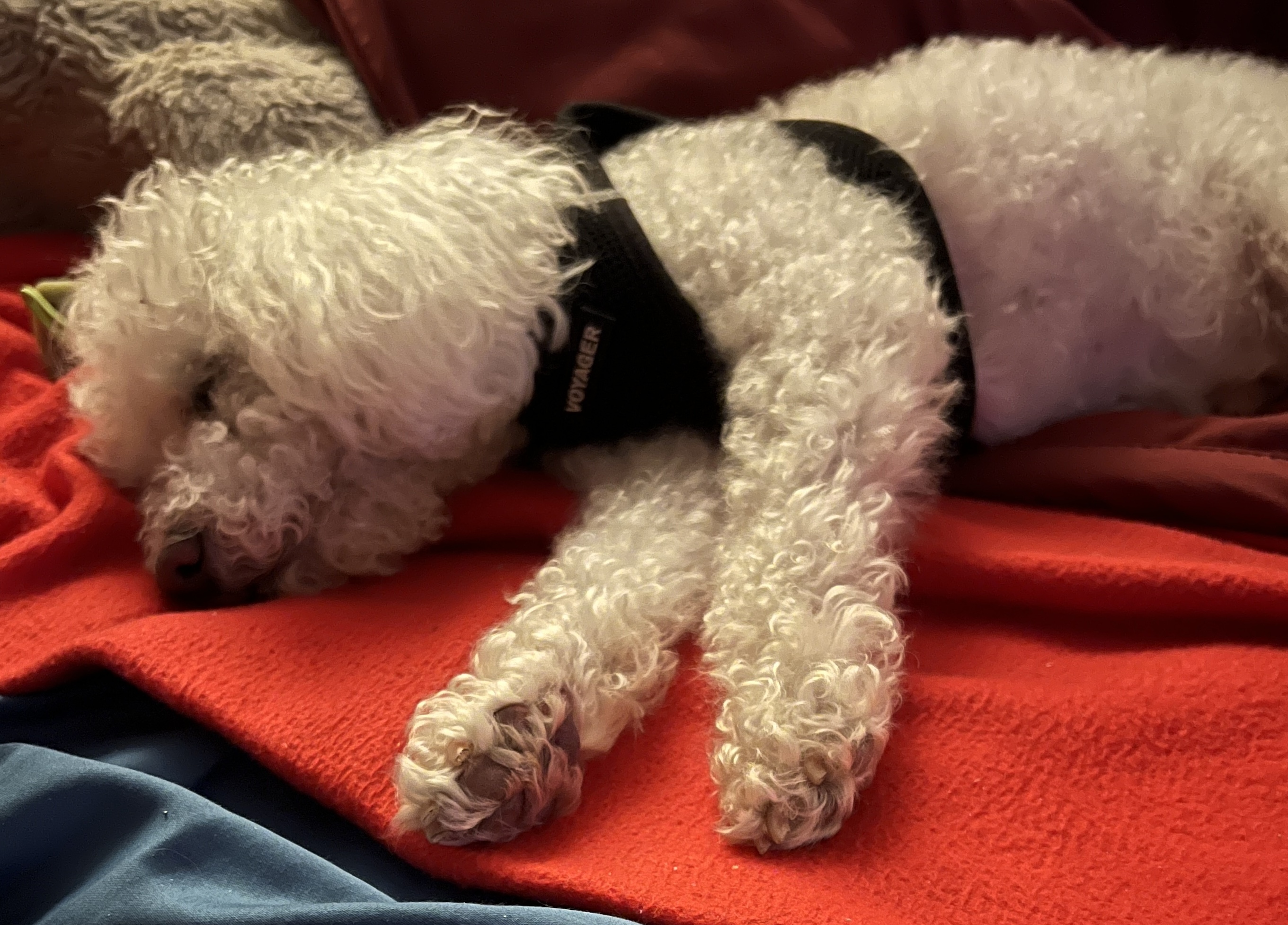
I would estimate that 80-90% of my photos used to be taken with an iPhone. The biggest reason for choosing to shoot with an iPhone is the excellent support for accessibility features that continue to get better with each iteration of iOS. Also, “the best camera is the one you have with you,” and my iPhone is never too far away, ready to capture the moment, even when it’s just my pup Bruno taking a nap.

A small poodle mix dog laying on top of a red blanket taking a nap

I still rely on my iPhone (now an iPhone 14 Pro) to take many of my photos, but the pandemic made me want more out of my photography. I’m happy to continue taking candid photos as well as landscapes that benefit from the wide lens of the iPhone, but one thing the iPhone lacks is reach (even with the 3X telephoto lens on my model).

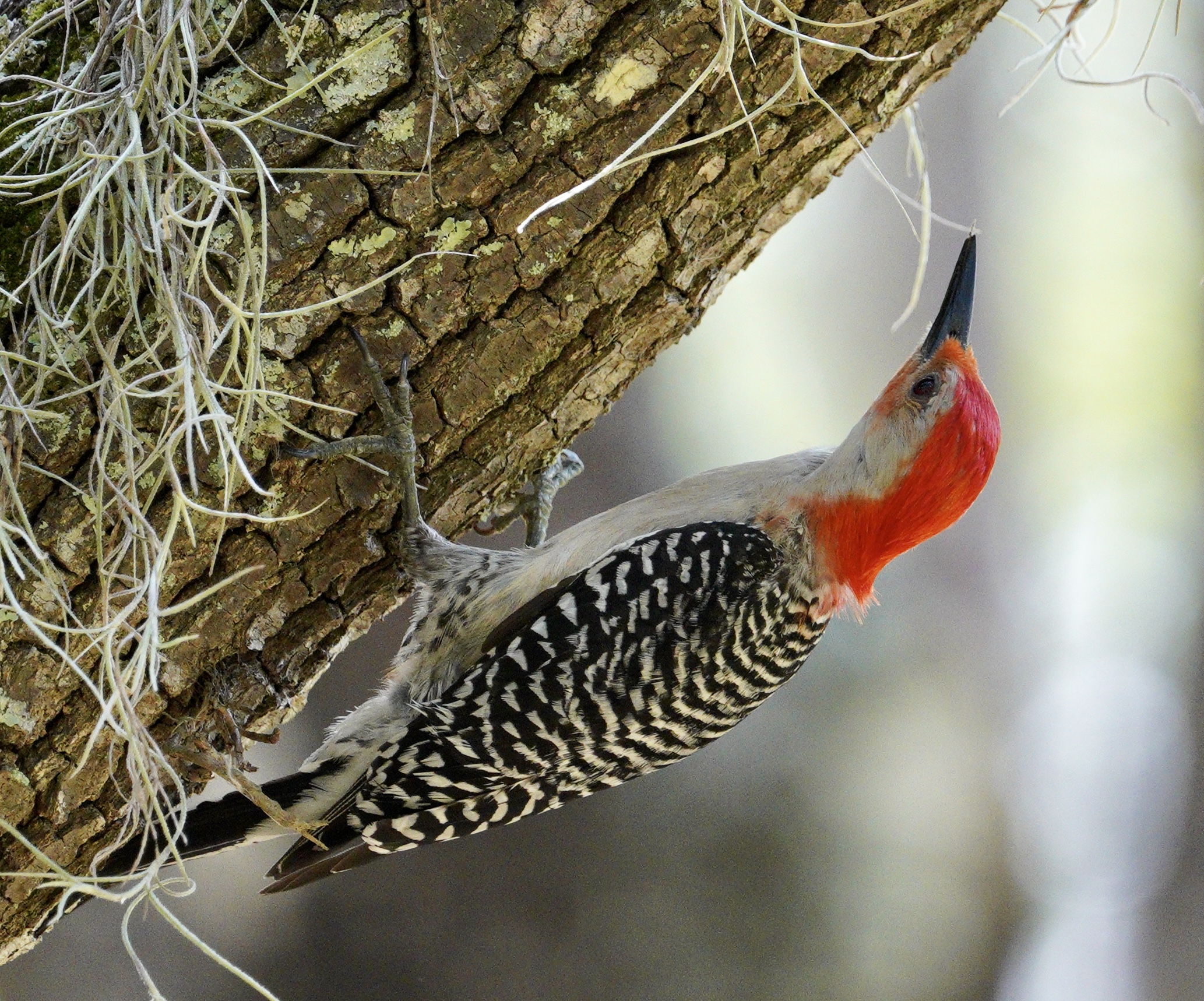
A red bellied woodpecker grabbing on to the trunk of a moss covered tree in an upside down position.
Sometimes you get lucky, as with this photo I took with my iPhone when a red bellied woodpecker landed near us at the park.

I would look at the wildlife photographers, with their huge lenses, and wish I could do what they were doing. The pandemic gave me the push I needed to not just wish I could do that kind of photography, but to actually make it happen. As someone with a progressive visual impairment, I have always felt a sense of urgency when it comes to experiencing the world with my eyes while I can. It’s complicated. I’m not saying that my experience will be lesser if I completely lose my vision, but let’s be honest for a second, it will be different. And besides my worsening vision, there is the fact that entering my 50s, no aspect of my health is guaranteed – the pandemic was a reminder of that. I want to do more photography while I can still move about with good legs and a good back, not just a serviceable set of eyes.

With those complicated feelings in the background, I set out to take my photography to the next level over the last four years. In this post, I will discuss every aspect of what I’m doing, from the gear that I’m now using to the workflow I use for capturing and editing the photos I share on social media.

Before I get to the details, I want to take a minute to share my gratitude for my partner Cindy. Without her, none of this would be possible. Fortunately for me, she shares my passion for photography and the outdoors and we make a good team. She makes it easier for me to get to the places I want to photograph, and she’s also my spotter. Without her help there is little chance that I would be able to notice some of the wildlife that moves quickly and blends so well with the surroundings when you are out in our wonderful parks where we live. A supportive partner is key, and I’m so grateful to have that.

Ok, now on to the details…

The Gear

The biggest change I’ve made is in my choice of gear. I still like my Nikon D3100. It’s great for flower photos and portraits, but it doesn’t have the reach or speed I need for any kind of wildlife photography. The reach is important for me for a variety of reasons. One, the Florida wildlife can be unforgiving, and I don’t want to be gator bait. Two, I can’t go to far off road if I want to be safe – I just can’t see tree roots and other obstacles. so it’s best that I stay on the trail or boardwalk if one is available and use the long reach of a telephoto lens to capture the wildlife from a safe distance

Although it was a big expense, the first thing I did during the pandemic was not take up gardening or learn how to make sourdough bread. No, I purchased my first full frame camera and a long telephoto lens. My current setup consists of:

It was quite an investment to put together this kit, but I can say without any doubt that it was worth it!

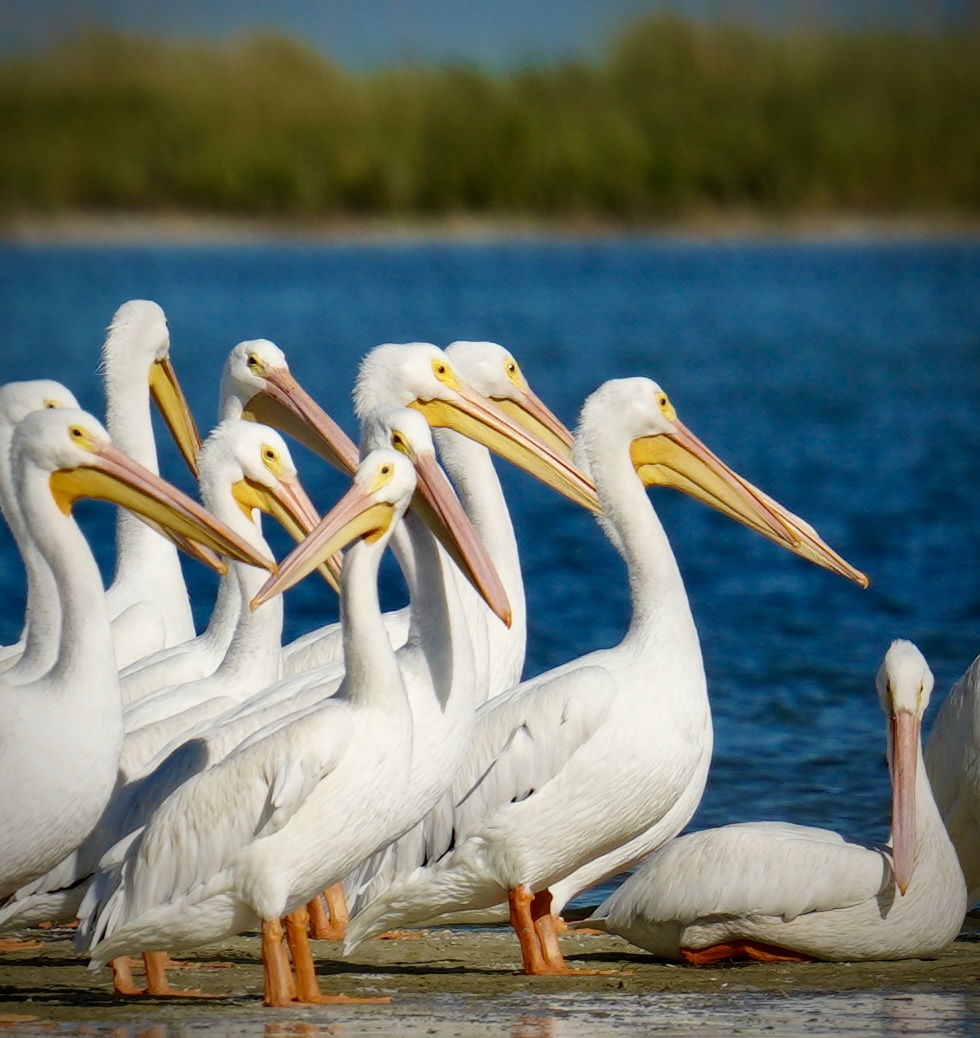
A group of white pelicans resting on a sandbar.
This photo is only possible with a long lens. These white pelicans are protected and you have to keep a minimum distance from their resting area in the sandbar at Fort De Soto.

The A7 III has a number of features that make it ideal for me:

  • Amazing auto-focus: my old DSLR only had a few focus points, but the Sony A7III has almost 700! It also has face and eye detection, and the latter can be set to find eyes of animals. It’s not perfect, but for larger birds (which are easier for me to photograph anyway) it works well enough and I need all the help I can get when it comes to focusing.
  • Burst rate of 10 fps (frames per second). This is important because I often don’t really “see” what I’m photographing. It’s challenging enough to capture a fast moving bird even if you have good eyesight, even more challenging when you can’t track it due to your visual impairment.
  • 24 megapixels. This is key because I often have to shoot a little wider than I would like to in order to make sure I don’t cut off an essential element of the wildlife and its surrounding environment. With more megapixels and a full frame sensor, I can do some serious cropping and still retain pretty good image quality. I already did this quite a bit with the iPhone, but with the full frame camera I have even more leeway in what I can do in post processing to “make the image.”

Not long after I purchased the new camera, Sony released a new model, the A7IV and guess what? – that camera has a screen reader! How helpful would that be! I could sell my current camera and upgrade (which is a pain because you lose so much money). It would be nice if Sony would just add the screen reader functionality with a firmware update for the older camera. Not holding my breath on that one (and there may be technical reasons why it’s not possible).

If anyone from Sony is reading this, please reach out – I have some suggestions for how to make the experience better for people with low vision, starting with adding an option for changing the colors and the thickness of some of the visual indicators. If I can spend less time making out what my camera is trying to tell me, that’s more time I can spend shooting.

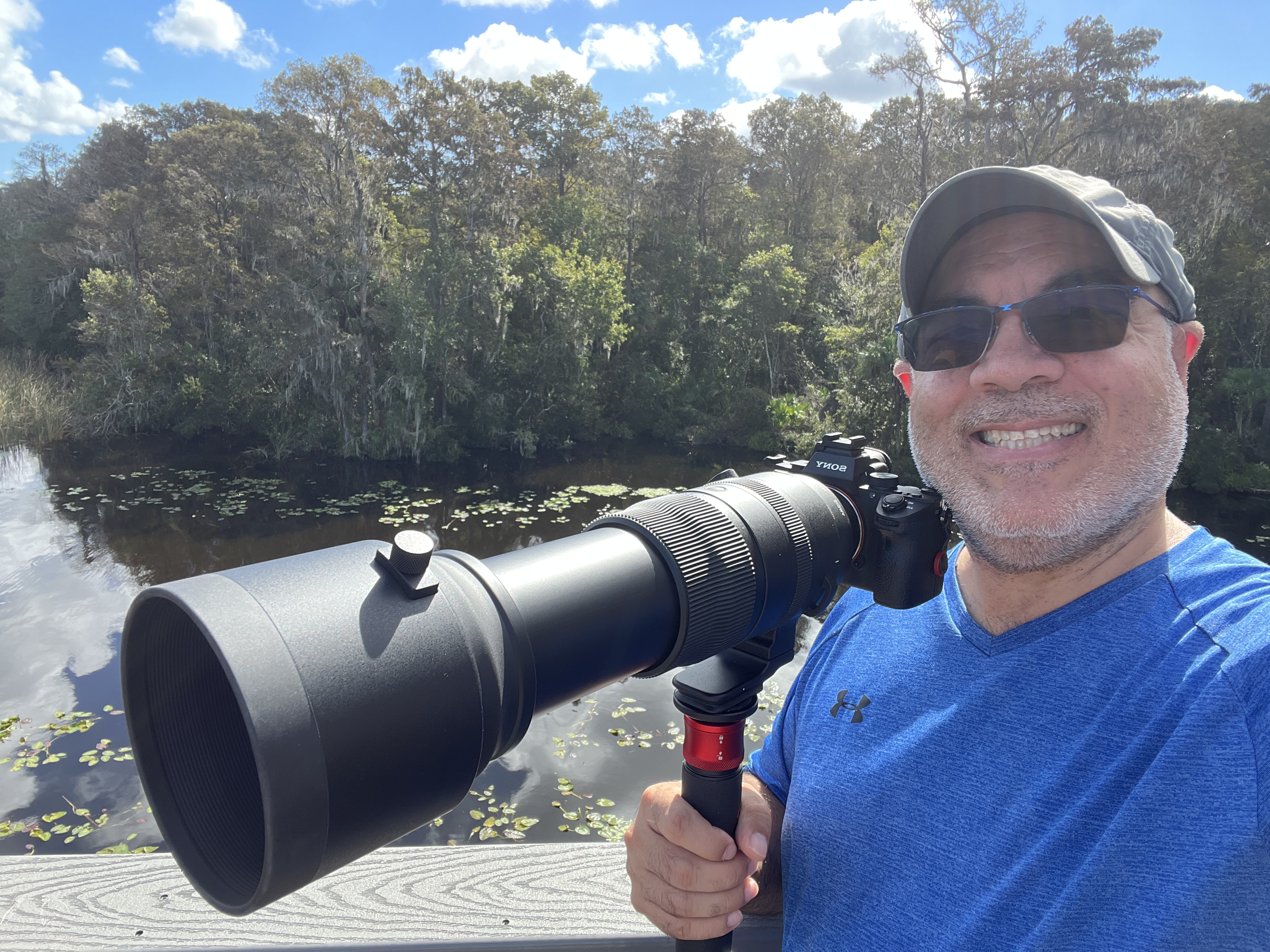
As for the lens, the 100-400 Sigma lens was a definite improvement over my older setup, but once I experienced the clear photos I was getting from my new camera and lens combo, I was hooked! I needed more! That brings me to my latest toy – the beast! I’ve nicknamed my Sigma 150-600 that because it weights almost five pounds. Walking around with it for a few hours provides all the exercise I need on the weekends. I balance it all on an iFootage Cobra carbon fiber monopod. I use a monopod because it allows me to be fairly agile with the big lens. I carry everything on a PGYTECH OneMo Camera Backpack 25L. I like that it came with a separate shoulder bag I can use when I just want to take the 100-400mm lens for a lighter set up.  

Luis posing with his camera and a long lens resting on a monopod. A lake and woods appear in the background.

I just added a Wimberley MH-100 mono gimbal head to my kit to make it easier to pan up when I want to shoot birds that are perched high on the trees, or follow a bird in flight (that last one is a real stretch for me, but a man can dream).

As for settings, during pandemic I finally mustered the courage to take the camera out of the automatic modes. Inspired by a webinar from Matt Kloskowski I found through a Facebook link (glad I clicked on that one), I shoot in manual – ok, manual -ish. Let me explain:

  • Aperture is set to the lowest F number my lens will allow when it is at its maximum reach of 600mm. I never change this setting because long telephoto lenses like the one I use need all the light they can get.
  • ISO – this is set to auto so that I don’t have to worry about it as I go through changing light conditions while out in the field. I let the camera do its thing when it comes to this setting.
  • Shutter speed – this is the one setting I play with. I typically follow the rule of using a shutter speed that is at least the length of the lens (1/800 for my lens for most slow moving birds such as herons and egrets).

It’s manual-ish because I’m only really controlling one variable, leaving one set at the same value most of the time, and letting the camera handle the third one that makes the exposure triangle. Exposure is the area where I have lots of room for growth.

For the focusing, I shoot continuous (don’t think I’ve ever changed this setting since I got the camera), with the drive mode set to burst high to take multiple shots each time I press the shutter. My focus mode is often expand flexible spot and I have the focus point indicator set just above center because I have a hard time seeing it out in the field. I used to do back button focus (where you focus with one button and take the photo with another) but I now keep things simple by using the shutter button for both focusing and taking the photo.

Another great tip from Matt Kloskowski (a fellow Tampanian by the way) – get low! How low? As low as you can go.

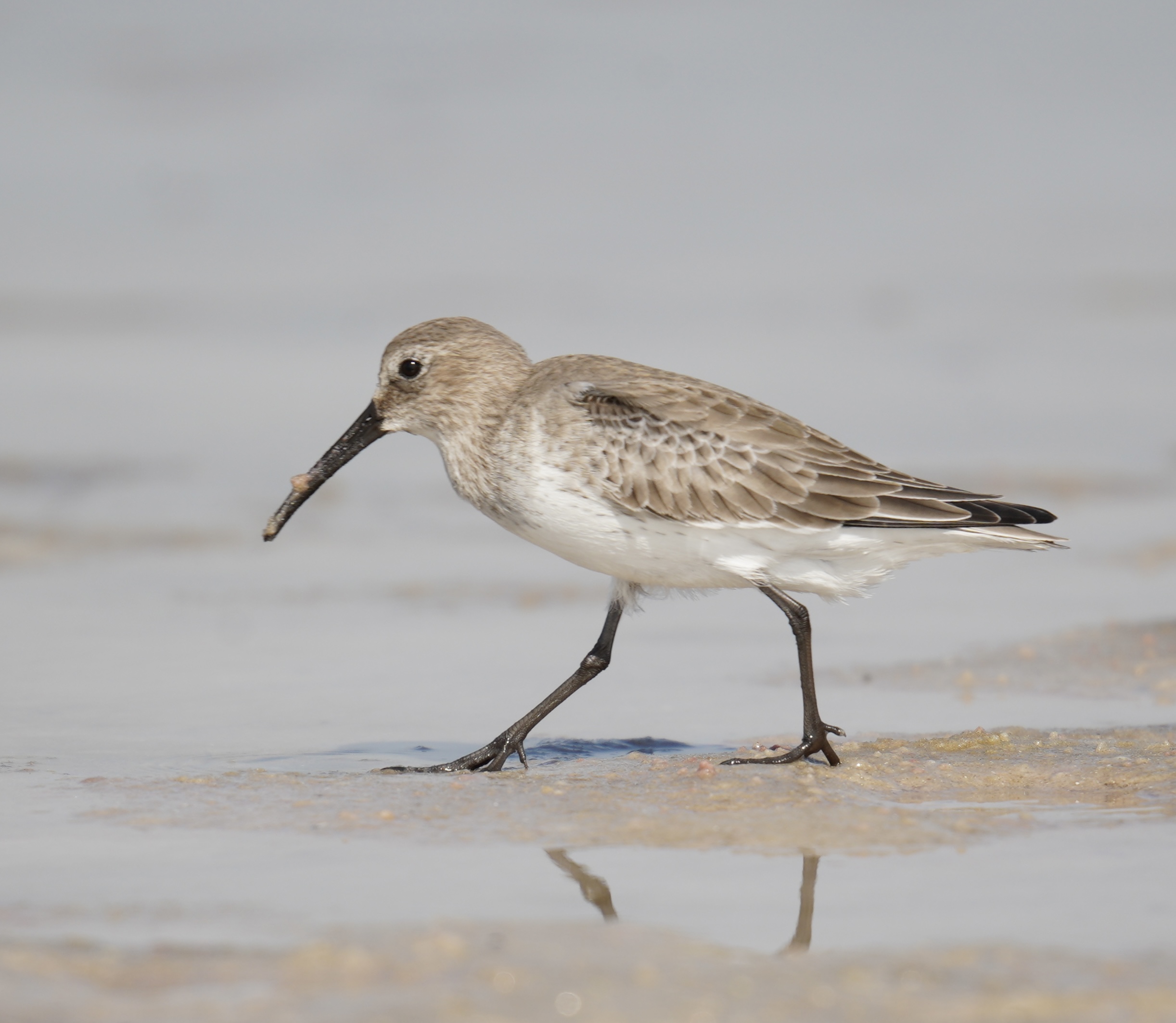
Dumlin, a small wading bird captured moving along the tide pool at low tide. It is a white and tan bird with a long, pointed beak.
I got real low to capture this dunlin as it moved about looking for food in the tide pool at low tide

You get beautiful bokeh (the dreamy, out of focus background) by increasing the distance between your subject and the background. Combined with the long telephoto lens, this will obliterate the background so that it can’t be made out and distract from your subject. If you can’t get low due to bad knees, here’s a trick: use a tripod camping chair. I do this a lot, especially if the ground is sketchy (I’ve gotten bitten by random bugs a few times, no fun). Another trick I’ll often use is to hold the camera low and use my LCD screen flipped up so that I’m looking down on it while I hold the camera in place with the monopod. It works if it’s not too sunny out, especially when shooting shore birds like sandpipers and plovers. The LCD screen on the A7 III is actually pretty good in terms of brightness and I find that sometimes it helps me to use the LCD screen to find the object I want to capture. I’ll move the screen around a bit until I see a change in light on the LCD – not sure how to explain it well, but it works for me.

The Workflow

Any kind of photography I do, whether with an iPhone or a traditional camera, is only made possible by digital media. A typical outing for me involves taking around 500 photos. Of those, i may choose 4-5 that are in focus and where I did not completely swing and miss with the composition and cut something off. It’s a numbers game for me. Now imagine going to the local CVS and trying to develop 500 photos at a time. That would be an even more expensive hobby and likely not possible for me to sustain. With digital, pixels are somewhat free (cost of the camera and lenses aside). I can take as many shots as I need and play the numbers game like a really bad hitter in baseball if you go by average number of keepers.

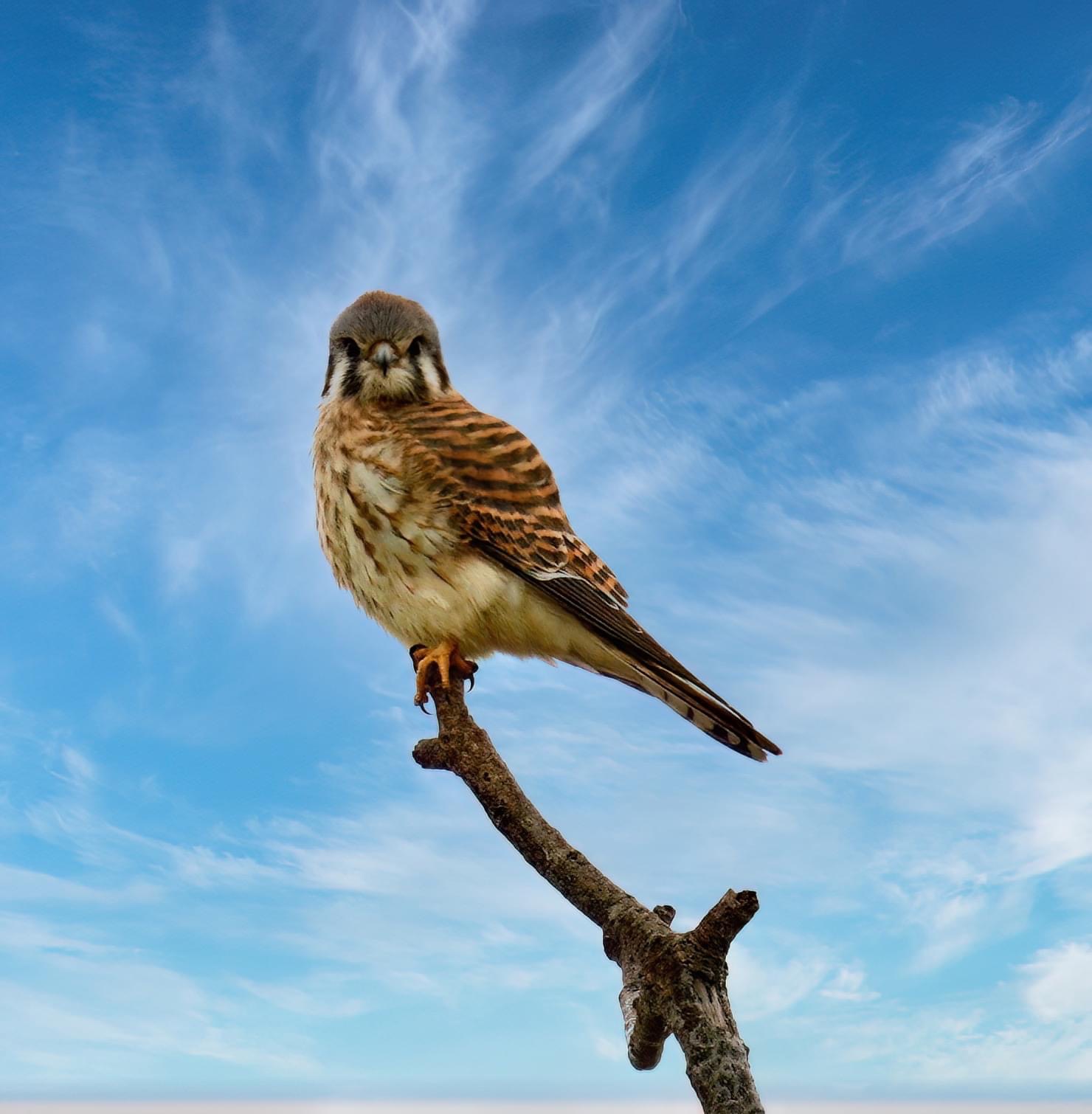
American Kestrel perched at the end of a branch. It has orange and black banded back feathers and a mottled brown front. The head is light blue on top  with black, orange and white vertical stripes on the sides.
This American Kestrel, captured at Fort De Soto is a keeper. It was one of the birds on my life list. The photo is a bit backlit, but you can’t give the bird any instructions as to where they should pose.

The first step in my process is to move the photos from my camera to a mobile device with a better screen where I can pinch and zoom to check focus. It used to be an iPhone, but these days it’s also an iPad Air.

I will perform most of my basic edits in the stock Photos app: cropping, strengthening, highlights/shadows, etc. At this point, I’ll mark the five or so photos I want to work some more on (the “keepers”) as favorites. I will transfer those to my computer over Airdrop.

On the computer, the only thing I do on each photo is run it through Topaz Denoise AI to remove some of the noise (grain). That software is like magic! Another Matt Kloskowski recommendation that panned out really well.

Female cardinal perched at the end of a branch with berries on it.
Another keeper with this female cardinal having some berries for a snack. You can see the grain in the background because this was taken in a shady area. Still like it though, and I cleaned it up a bit with Topaz later.

The rest

The last step is to share the photo on Facebook and Vero (no more Instagram for me – it’s too much like Tik Tok now). And that’s how 500 photos become 5 or 6. It’s not pretty, and it takes time, but I really enjoy the entire process (ok, maybe not the file management part – I’m now constantly playing a game with my iPhone and iPad to clear up space for more photos).

The gear, the settings, that’s only part of what goes into taking decent wildlife photos. The other part involves research. I spend a lot of time on the eBird app checking out what other birders have spotted in the area. I also follow a number of groups on Facebook for specific areas (Friends of Fort De Soto) or types of wildlife (mostly local birding groups). That helps me narrow down where I go on a given outing in hopes of increasing my chances of capturing a bird on my life list. If you’re curious, they are:

  • Barred owl – my nemesis…lol..I’ve spent more hours on this one than any other. The closest I’ve gotten is hearing the call a few times but with no luck in finding the actual birds in the woods.
  • Belted kingfisher – this one will be tough. It’s a really small and fast bird that feeds by taking quick dives into the water.
  • Merlin (a small falcon) – I found the kestrel, I’m pretty confident I will find this one too at Fort De Soto.
  • Cooper’s hawk – each time I’ve thought I had this bird it turned out to be a different type of hawk (broad shouldered or red shouldered).
  • Red tailed hawk – I see lots of red shouldered ones, but not this one)

One bird that’s missing from the list now: the bald eagle! I found a nest and finally got to see one in the wild, not at a zoo or rescue. The nest is on a cell phone tower that is well out of reach so the photos I got are a little blurry, possibly due to the heat coming off the water.

Bald eagle in flight with wings spread out.

The other app I use is Merlin (like the falcon). It has really nice descriptions of each species along with all of their calls. Merlin also has an excellent AI-based feature that allows you to upload a photo and get an ID almost immediately with 90% accuracy. This helps me provide better descriptions when I share the photo online.

While out in the field, I will also use the app’s audio recognition feature to identify potential subjects. With many birds, such as owls, you are more likely to hear them before you see them (especially in my case). I can’t recommend these two free apps enough. They are an essential part of my kit, just like my camera and lenses.

Conclusion

In the end, you really have to like what you’re doing if you choose to do wildlife photography, because it takes a lot of patience. There’s lots of waiting involved.

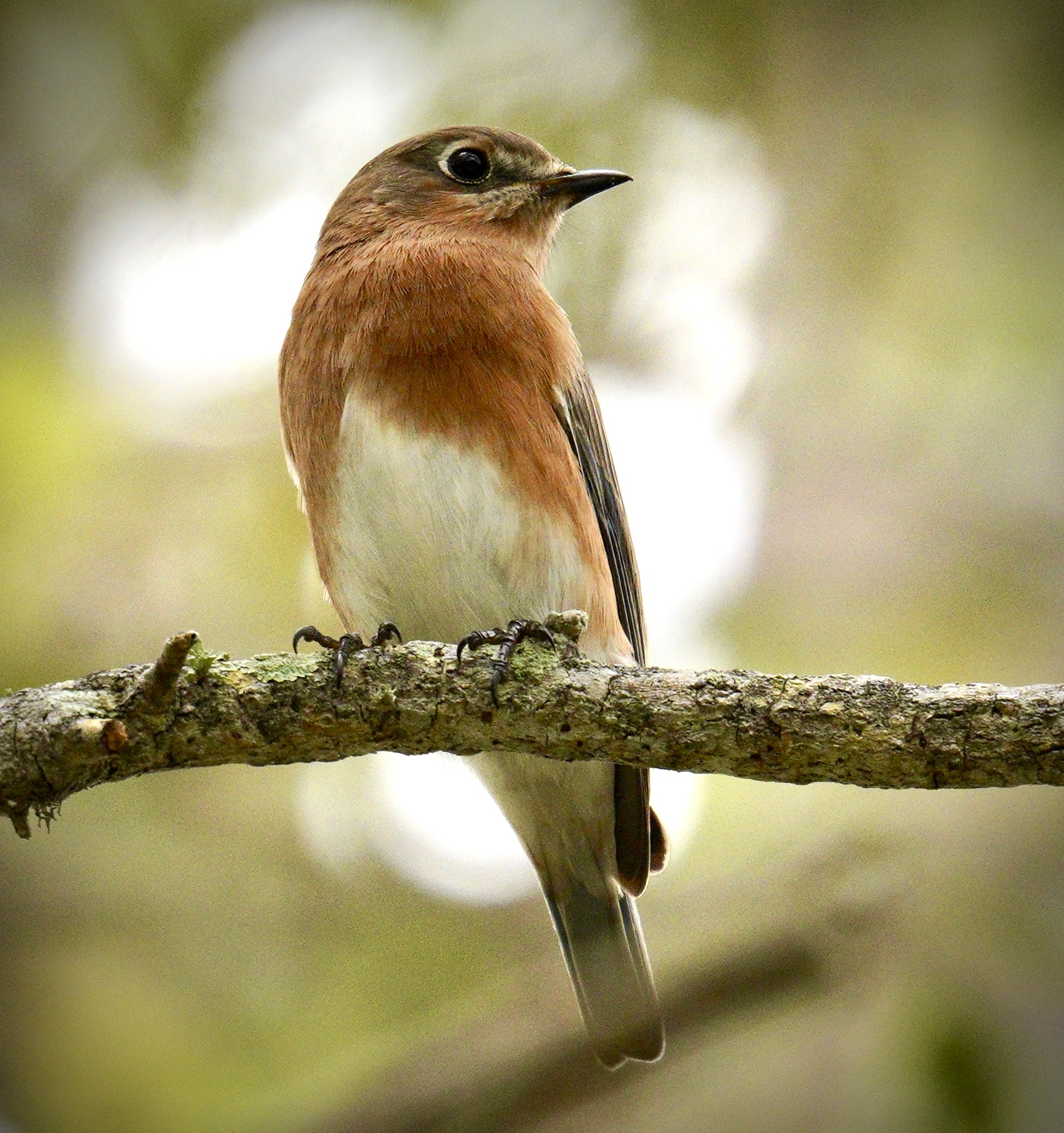
Eastern blue bird perched on a branch. It has a brownish band across the chest with a white underside and blue wings that are barely visible.
We waited more than an hour for one of these birds to finally land on a perch where I could capture it without any branches in front of it. Worth it! It’s a beautiful female Eastern blue bird.

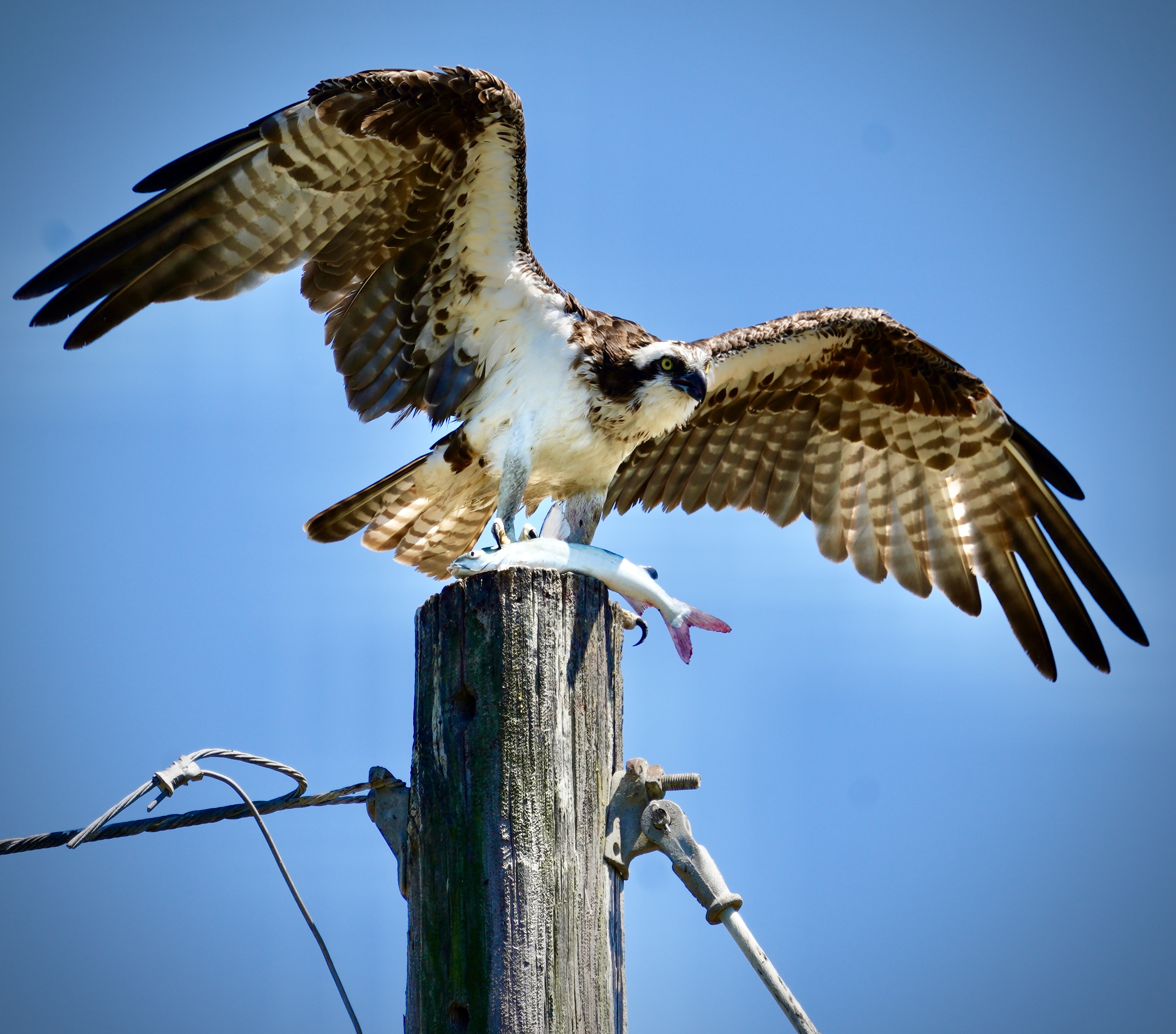
Then just when you’re getting ready to go home, a bird you’ve never seen before shows up and you almost miss the shot. It’s a lot like fishing, and just as expensive.

Osprey that just landed on top of a wooden post with a big fish on its talons. The osprey has its wings spread out.
One of those “nothing to see here, let’s go home” photos.

But the waiting also makes wildlife photography such a great activity for mental health. When taking the photos, you can’t rush. You have to not only settle in and wait until you get the bird (or other wildlife) to show its best side, but when you take the photo, you have to slow your breath and really focus so that you don’t introduce unnecessary shake that can result in a blurry photo. You have to be present and forget about everything that’s worrying you in that moment. That, along with the fact that it gets you out in nature where you can enjoy some sunlight and fresh air, makes it a great activity for addressing stress.

I think that covers everything I want to share in this post. Feel free to reach out if you have any questions (@eyeonaxs on Twitter).

Update: I just found out I can share my entire Vero gallery outside the app. I have also reached out to the Vero team to inquire about alternative text and how we can make that app more accessible. I have been using the comments to identify each bird as I post, but alternative text (along with the comments) is the ideal solution. I’ll update this post based on what I hear back from them.

3 Ways the iPhone Has Disrupted My Life for the Better

The 10th anniversary of the iPhone announcement in 2007 was mentioned on a number of podcasts I listen to this past week, and this got me into a reflective mood. I can remember vividly where I was when the announcement took place. At the time I was a graduate student at the University of South Florida, and I watched the announcement on the big screen in the iTeach Lounge where I worked as a graduate assistant.

I must admit that at first I was a bit skeptical. The first version of the iPhone was pretty expensive, and it took me a year after the launch to decide that I wanted to get in on the fun.  If I remember correctly, it cost me $399 for 8GB of storage when I bought my first iPhone from Cingular Wireless (remember them?). As cool as that first iPhone was, it took two important developments to make me a true believer.  The first one was the release of the App Store in 2008, which opened up  a world of possibilities only limited to developers’ imagination. The second was the accessibility support announced with the release of the iPhone 3GS. After my first iPhone contract with Cingular was up, I actually returned to a traditional flip phone for a little while for my next phone. Once the accessibility support was announced, though, I was locked in. I have been an iPhone owner ever since.

In addition to the App Store and the built-in accessibility support, there are three other important ways in which the iPhone has disrupted my life in significant ways that go beyond just being able to have access to information and communication on the go.

A Better Set of Eyes

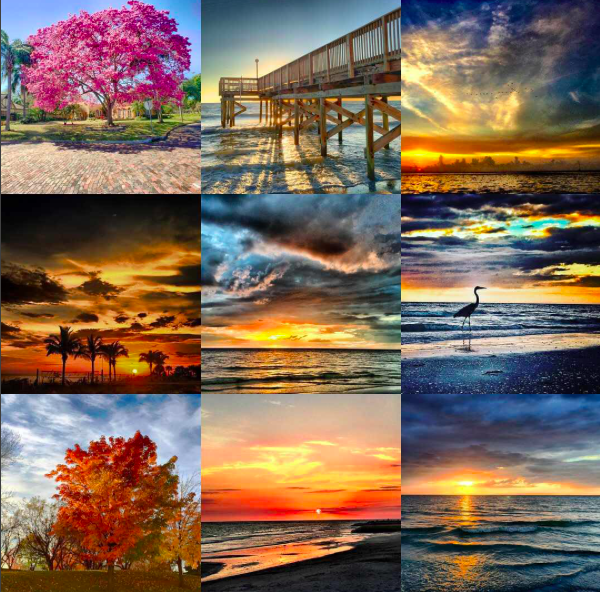
The iPhone couldn’t have come at a better time for me. At the time, my vision loss was getting the point where using a traditional DSLR camera was becoming harder and harder. As I detailed in an article for the National Federation of the Blind’s Future Reflections magazine, the built-in accessibility features of the iPhone have allowed me to continue with my passion for capturing the beauty in the world around me. The way I see it, the iPhone is now “a better set of eyes” for me. Most of the time, I can’t be sure that I have actually captured a decent image when I aim the phone at a scene. It is not until later, when I am reviewing the images more carefully at home, that I notice small details I didn’t even know were in the frame. You can see some examples of my photography on my Instagram page.

Instagram collage showing best nine images of 2016.

Going forward, this idea of the iPhone as my “best set of eyes” is going to be important to me beyond photography. As my vision loss progresses, I will be able to rely on the iPhone’s ever improving camera to recognize currency, capture and read aloud the text in menus, business cards and more, and tell me if my clothes are exactly the color I intended. I have no doubt that “computer vision” will continue to get better and this gives me hope for the future. Already, the VoiceOver screen reader can recognize some objects in your images and describe them aloud. This technology was developed to make searching through large image libraries more efficient, but it will be helpful to people with visual impairments like me as well.

Independence at the Touch of a Button

The second major way the iPhone has disrupted my life for the better is by giving me back my independence in a big way, through apps such as Uber and Lyft. Now, I know you can use these apps on other smartphones, so they are not exclusive to the iPhone. However, when you really think about it, no iPhone means no App Store. No App Store means there is no incentive for other companies to copy what Apple did.

Uber has replaced the many frustrations I had with public transportation (lateness, high taxi fares) with a much more convenient and less expensive solution. Yes, I know some of my blind friends have had a number of issues with Uber (such as outright discrimination from drivers who are not comfortable with a guide dog in their vehicles), but this would probably happen with taxicabs too.

My own experience with Uber has been mostly positive, and the service allows me to easily get to doctor’s appointments, and provides me with a reliable way to get to the airport so that I can do my work of spreading the message of accessibility and inclusive design for education to a broader audience beyond my local area. Uber and Lyft, and the iPhone as the platform that made them possible, have really opened up the world to me.

Can You Hear Me Now?

One of the big trends at the Consumer Electronics Show (CES) this year was the presence of Alexa, Amazon’s voice assistant, on all kinds of consumer appliances. Alexa joins Apple’s Siri, Microsoft’s Cortana and Google’s Assistant in heralding a future where voice and speech recognition replace the mouse and the touch screen as the primary input methods for our computing devices. We are not quite there yet, but the accuracy of these services will continue to improve and I am already seeing the potential with some of the home automation functions that are possible with the existing implementations (having my lights be automatically turned on when I arrive at home, for example).

Here, again, the iPhone deserves quite a bit of credit. The release of Siri as part of the iPhone 4S in 2011 brought the idea of speech recognition and voice control to the mainstream. Previously, its use was limited mostly to individuals with motor difficulties or niche markets like the medical and legal transcription fields. Siri helped popularize this method of voice interaction and made it more user friendly (remember when you had to sit for several minutes training speech recognition software to recognize just your voice?).

Looking Ahead

The smartphone is a mature technology and some have questioned whether it has reached its apex and will soon give way to other options for content consumption and communication. One possibility would involve virtual, augmented or even mixed reality. Given the visual nature of AR and VR this gives me some cause for concern just like I had at the release of the iPhone back in 2007. However, just like Apple took a slab of glass and made it accessible when few people thought it could, with some creativity we can make AR and VR accessible too.

We have come a long way in just 10 years (sometimes I find it hard to remember that it has only been that long). In that time, Apple has shown that “inclusion promotes innovation.”  Accessible touch screens, voice controlled assistants, ride sharing services, are just a few of the innovations that have developed within an accessible ecosystem started with the iPhone. Thank you Apple, and congrats on the 10th anniversary of iPhone.Here’s to the next 10, 20 or 30 years of innovation and inclusion.


A Visually Impaired Photographer Experiments with the GoPro

As many of you who follow me online know, I am very passionate about photography and the possibilities it presents to us as people with disabilities to tell our own stories and exercise our creativity. I love to use my iPhone to take photos because it incorporates so many accessibility features that help me with my photography, such as Zoom, VoiceOver and Invert Colors. However, I am always looking for new options to expand my photographic horizons and the Go Pro action camera is one such option that has fascinated me for some time. I believe that just because you have a disability it doesn’t mean you should not be able to ski, sky dive, or do anything else you set your mind to doing, and the Go Pro has become the go-to camera when it comes to action sports and an active lifestyle.

I started out with the  least expensive option in the GoPro lineup, the new entry-level Hero which retails for $129.  However, after about a week with the camera, I returned it and opted for the older Hero 3 white model, which is think is a better fit for my needs. The new entry-level Hero has a number of shortcomings due to its low price and limited feature set. However, if you’re an educator looking for an inexpensive camera for recording classroom activities (science experiments, plays and performances, etc) this is a nice camera and there are ways to get around its limitations:

  • it does not have an LCD screen for framing shots and adjusting camera settings like the more expensive Go Pro 4 Silver. I don’t think this is  a significant drawback, since use of  the LCD screen outdoors would be difficult anyway due to glare. The camera’s wide field of view makes it likely that you will capture the shot you want even when you can’t frame it with a viewfinder. For someone who has tunnel vision, the wide FOV is actually one of the things that made the Go Pro so attractive to me. Go Pro does sell an add-on LCD screen but I’m not sure if it is supported on the new Hero. Regardless, using the add-on screen will probably lead to reduced battery life.
  • it does not support Wifi connectivity. With other Go Pro cameras (like the Hero 3 White I eventually traded up to), you can set up a Wifi connection between the camera and a smartphone to control the camera and see what you are capturing. However, as with the addition of an add-on LCD screen, a drawback to Wifi connectivity is that it drains the battery much faster.
  • it has a built-in battery that cannot be replaced or swapped out to extend the length of time the camera can be used in the field.  A workaround for this is to use any of a number of smartphone or tablet external batteries that matches the needs of the Go Pro (5V and 1-1.5 amps). The external battery will allow you to capture longer time lapse photos where the camera has to be turned on for extended periods of time. I was also fortunate to find an old power adapter for a Kodak zi8 camera that  allows me to plug in the Go Pro to a wall outlet to charge it much faster than through the USB port on a computer.
  • it does not support the higher resolutions of more expensive Go Pro cameras. The Hero tops out at 1080p (30 fps)  and also supports 720p at 30 or 60 fps. It does not support 4K, which is fine by me as the higher resolutions result in huge files I can’t possibly store or process on my Macbook Air.

Despite its limitations, I still think the new Go Pro Hero is a  nice entry level camera for use in educational settings. It provides access to the many possibilities for using this type of camera to support learning (examples of which are featured on this website by Lisa Tossey) but at a very reasonable price. However, from an accessibility perspective, the biggest problem is not the lack of an LCD viewfinder with features such as large text or a high contrast mode. Rather it is the fact that there is not an option to set up spoken feedback other than a series of beeps as you advance through the various menu screens which are displayed in a small window on the front of the camera. If the camera had Wifi connectivity I could probably use VoiceOver and other accessibility features on my iPhone to get better access to the camera menus and settings.

This possibility convinced me to exchange the Hero for the older Hero 3 White, which does support Wifi. I was able to download the free Go Pro app from the App Store and it has some VoiceOver compatibility.  I’m convinced that with a few tweaks this app could be made very accessible to the blind. For the most part the  buttons have VoiceOver labels that can be spoken aloud to a blind user, but these labels could be improved so that they are clearer and easier to understand when read aloud.  For example, I don’t need to hear the following when I choose the option for reviewing the clips on my camera: GoPro app, list view icon, cam roll. Just describing it as Camera Roll would be sufficient. Surprisingly, the shutter release button is the only button or control with no label at all (it just says “button”). In any case, through the Wifi connection I will still be able to use Zoom and other accessibility features on my iPhone even if the app does not have great VoiceOver support.

With the Hero 3 White I lose the following  features which are only available in the current generation cameras: Quick Capture, Super Wide Capture and Auto Low Light. Quick Capture allows the capture of video with a single tap of the top button and time lapse with an extended press, while Super Wide extends the FOV slightly and Auto Low Light gives the camera better dynamic range in low light situations. Of these three features only Super Wide would be significantly helpful to me. I don’t shoot in the kinds of environments where Auto Low Light would come in handy (due to my difficulties with navigating low-light environments) and Quick Capture is a nice-to-have but not an essential feature.

The Hero 3 White also has a slightly lower top frame rate for photos, topping out at 3fps as compared to 5fps for the new Hero, as well as a smaller capacity battery.  However, I can compensate for the smaller capacity battery by purchasing a number of inexpensive add-on batteries (retailing for $15-20 each) which the Hero 3 White supports but the new Hero does not. The swappable batteries would make up somewhat for the battery drain resulting from the use of the camera with a Wifi connection to my iPhone for accessibility support.

Along with the Wifi connectivity, the Hero 3 White also has support for an HDMI port (for connecting the camera to a HD TV), the ability to connect an external microphone for improved audio (using an adapter), support for  higher capacity memory cards (topping out at 64GB as opposed to 32GB with the new Hero) and again,  swappable batteries. The Hero 3 White has more customizable time-lapse settings, allowing for intervals from half a second to a full 60 seconds. The new Hero on the other hand is set to a single interval of half a second. Both cameras are very similar in terms of mounting options and underwater performance (with a top depth of 131 feet in each case).

I have had great fun with the  Go Pro cameras during the short time I have owned them, and I really think the Hero 3 White will be a better action camera for me than the entry-level Hero (at least until I can get one of the higher priced models like the Go Pro 4 Silver). I end this post with this photo I took with my new GoPro during a recent visit to the beach.

Go Pro selfie taken at the beach in St. Petersburg, Florida.


iPhoto App and Accessibility

This weekend I finally had a chance to try out the new iPhoto app Apple released along with iPad 3 (or as they are calling it “the new iPad.”) As an aspiring photographer I was impressed with the many options for organizing, editing, and sharing photos Apple has packed into this app which only costs $4.99 in the App Store. There have been many reviews of the new app posted online already, so I will not add another one here. However, I do have a unique perspective on the new app that I would like to share. Not only do I like to take photos (calling myself a photographer might be a stretch but it’s a hobby I enjoy and continue to try to get better at every day), but I also have a visual disability so I am part of a small community of blind photographers.

When I opened the iPhoto app on my iPhone, the first thing I did was turn on the VoiceOver built-in screen reader to hear how it would do with the new photo editing app. Frankly, I was not surprised that the new iPhoto app would be as accessible with VoiceOver as it is. I have come to expect accessible products from Apple over last few years, and I’m proud to be associated with it as an Apple Distinguished Educator. However, as I dug deeper into the iPhoto app with VoiceOver, the level of attention to detail in providing accessibility was still pretty impressive. For example, the brushes used to retouch photos (repair, lighten, darken, etc) are all accessible through VoiceOver gestures, as are the exposure and color correction controls and the various effects, . When I selected the crop tool, VoiceOver told me to pinch to resize the photo and as I did so it told me how much as I was zooming in as well as how far the image was offset (“image scaled to 15X, image offest by 15% x and 48% y).

On the iPad, there is a dedicated help button that opens up a series of overlays indicating what each button does. Not only was every part of the overlay accessible, but so is the entire help built into the iPad version of the app. The attention to detail is more impressive to me because there are so few blind photographers who would take advantage of an app such as iPhoto. What it does show is the level of commitment Apple has to accessibility, because it will go to great lengths to add accessibility even when only a few people will benefit from it.

In a recent blog post, accessibility advocate Joe Clark called out a number of hot new apps (Readability, Clear, Path, and Flipboard) for what he called irresponsible web development that results in accessibility barriers. Well, to me this new iPhoto app shows that you can design an app that is not only visually appealing, feature-packed and easy to use and learn, but also accessible to people with visual disabilities. I hope more developers start to realize that accessibility does not have to compete with good design, but that both complement each other.

When I first loaded the iPhoto app on my iPhone (that was the first device I installed the app on) I was too impatient to go on the Web and read about the app before I started to work with it. That’s just the kind of user I am, I like to get right in and try things out. Well, on the iPhone app the Help button from the iPad version of the app is missing. Most of the icons make sense, but in some cases I was unsure, so what I did was turn on VoiceOver and move my finger around the screen to have it announce what each button was for (or to at least give me a better idea). In that case, compatibility with VoiceOver helped me learn the app much faster without having to consult the help, and that got me to thinking. As these devices (phones, tablets, and whatever comes next) continue to get smaller and the interfaces start to use more visuals (tiles, buttons, etc.) and less text, the ability to hear the help may become an essential aspect of learning how to use the interface. In this way, features like VoiceOver would actually enhance the usability of a particular app for everyone – what universal design is all about.


2012: The Year I Quit Photography?

Well, not quite. But it will definitely be the year I make a major transition in my photography. As I will explain below, 2012 will be the year that I begin to take most of my photos with my iPhone. Since I purchased my iPhone 4S this fall, I’ve been using it more and more as a replacement for my Nikon D3100 DSLR camera. The improved camera specs of the iPhone 4S (8 megapixels at F2.8), along with the new features in IOS 5 (such as quick access to the Camera app from the home screen, the ability to use the volume up button to take a photo and VoiceOver compatibility) make the iPhone the ideal device to “capture the moment” for someone like me.  As Chase Jarvis has stated, it is the camera that’s always with you, always at the ready to document those fleeting moments in life.

However, it’s not only the convenience and ease of use of the iPhone that’s drawing me away from using a traditional camera to capture images. As most of you reading this know, I have a visual impairment and I’m slowly losing my vision to a condition called retinitis pigmentosa, or RP for short. At the moment, I have less than 10 degrees of vision left (less than 20 degrees qualifies you as being legally blind). RP leads to progressive vision loss starting with peripheral and low light vision. In my case, my low light vision is what has been most affected by my RP, but the usual closing in of the field of the vision is also there.

I’ve been lucky that my progression with vision loss has been pretty slow, but the last few times I’ve gone out to shoot with my camera, I’ve noticed some changes in my remaining eyesight. It’s ironic that it is photography that is helping me judge these changes in my vision. I’m not sure if these changes are really there or if it’s just my mind playing tricks on me. Much of what I’ve read about RP states that people with the condition lose most of their peripheral vision around the age of 40, and guess what, I turn 40 in a few days. So, maybe it’s all in my mind, but the last few times I’ve gone out with my camera I’ve ended up with some major eye fatigue and pain afterwards. I think what’s happening is that since I can’t see that much of the frame through the viewfinder, I’m having to move my eyes a lot to make sure I have framed the shot properly. All of this eye movement is probably fatiguing my eye muscles, so that when I get home I have pain in my eyes and the area around them. It usually takes a few doses of pain relief medicine and some warm compresses for the eye pain to subside, and I would rather avoid it if at all possible.

I love photography, and I would hate to give it up. However, when I got into this hobby I knew that the day would eventually come when my vision loss would make photography really difficult. I have no regrets for having spent a considerable amount of money on my DSLR and my lenses and other accessories over the last couple of years. I would not give up the joy that the hobby has brought me over that time. My photography has allowed me to experience a lot of beauty around me that I would normally miss with my own eyes (the camera has a far better range of vision than my own eyes). I also saw photography as a challenge, not only for myself but also for all of us who have visual impairments. I have always enjoyed the expression on people’s faces (when I can see them) when I step up to a spot with my white cane and pull out a camera to take a photo. I know they look, and I know they probably ask themselves “wait, isn’t he blind, why is he taking a photo?” If I have forced anybody to confront their preconceived ideas of the meaning of blindness and disability, then it has been all worth it to me. I can continue to make a similar statement through my use of the iPhone as a video and still camera.

So the thought that has been on my mind for the last few days of 2011 and the first few of 2012 is, where do I go from here? Well, I would say that for 95-99% of the time I will be using the iPhone to take photos. The large, bright, sharp display on the device will make it easier for me to frame shots without having to stress my eyes as much. I also plan to use a trick I recently learned that makes it easier to take a photo by pressing the center button on the Apple headphones. I’ve looked at other options, but for now the iPhone appears to be the best one for me. The wide selection of apps with filters also means that even if I don’t quite get a picture right, I can apply a few filters and turn my failures into “creative experiments.” In some ways, I find not having to know so much about my camera sort of freeing, in that I can now focus on getting the best composition and less on what my camera is doing. In some ways, that’s exciting.

My DSLR camera does have a LiveView mode that allows you to use the LCD screen to frame a shot, but that mode is very slow (defeating the purpose of having a DSLR) and it is difficult to get sharp photos if you’re not using a tripod. Having said that, I have no plans to sell my camera and lenses. I could still use the LiveView mode for recording the videos I use in my tutorials on mobilelearning4specialneeds (after all, video is the reason that mode is in the camera in the first place). I could also use the camera for some brief shoots in a favorable lighting conditions. Limiting my time using the viewfinder will be the key, as will be making sure I take frequent breaks to let my eyes rest in between shots. At the very least, I will keep my camera and lenses as a nice present for my daughter when she gets older (though I’m sure there will be much better technology for her to choose from at that time).

I’m so grateful to Apple for taking the iPhone in the direction that it has by making it such as great portable camera (it is now surpassing traditional point and shoot cameras in the number of uploads on Flickr, one of the most popular photo sharing sites). Without the iPhone 4S, I think 2012 really would be the year I end my journey as a photographer. The way I see it, without digital I would have never gotten into photography in the first place (too costly considering the number of photos I have to take for a few good ones to turn out), and without the iPhone I would not be able to now continue in the hobby. It has been a beautiful journey with its usual ups and downs (times when I have gotten really frustrated when I couldn’t take the photos I wanted to, either because of my lack of technical expertise or the limitations of my eyesight), but I wouldn’t change a thing. There is a saying well known to those who follow Apple, “here’s to the crazy ones.” Well, I guess photography helped me see myself as one of those crazy ones who can change the world one small step at a time. It is crazy for someone with my kind of visual impairment to invest the money and time I have in pursuing a hobby like photography, but I hope that my crazyness has inspired somebody else to take on their own crazy adventure into whatever hobby fills them with joy and passion.

This long blog post is really the inspiration for the video I submitted for my application to the 2012 ADE Global Institue in Cork, Ireland, which is available below: