One of the areas where I have some difficulty with my visual impairment is finding the cursor on the screen. I love that OS X has a large cursor as one of the accessibility features. The large cursor setting can be found under System Preferences, Accessibility, Display in Mountain Lion and System Preferences, Universal Access, Mouse and Trackpad in other versions of OS X.

However, the large cursor is not always enough for me, especially as my vision gets worse. I would love it if there were mouse trails or some other visual indicator to help me more easily pick out the cursor when I move it.
I have used a number of cursor enhancements for the Mac in the past, including Mouse Locator and Mousepose. Right now I am trying Omnidazzle for this purpose and it is working rather well. Omnidazzle is a free cursor enhancement intended as a presentation tool to help the presenter highlight key information on the screen. By pressing a keyboard shortcut (usually Control + `) you can bring up effects such as a spotlight, highlighting the foreground window, and more. The one that I have found the most useful for me is the Bullseye one.
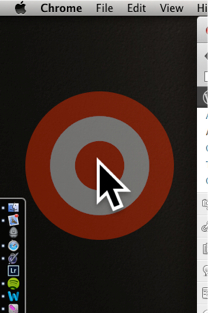
I have set this effect to bring up the bullseye when I shake the mouse. This is great, because whenever I lose the cursor the first thing I try to do it is move it around quickly to create some movement on the screen that I can pick up with my limited peripheral vision. With Omnidazzle (sounds like it was created by Snoop Dogg, doesn’t it), a large red, bullseye will come up around the already large cursor. You can change the color, but red is one I can easily pick out.
Omnidazzle is freezzle, so check it out and let me know if you find it helpful.
 The Website of Luis Perez